
Skip to content
TodoTrail
How it worksLive demoPricingBlog
Sign inCreate my first route
Menu
How it worksLive demoPricingBlogSign in
  1. Home
  2. Use cases
  3. A Visual Todo List That Shows What Comes Next

Visual todo list

A Visual Todo List That Shows What Comes Next

Turn a short daily list into a route you can scan, rearrange, and follow without choosing from the whole backlog after every task.
Create my first route See a sample route
A visual task route beside a dense traditional todo list
The same work feels different when the next action has a visible place.

ON THIS PAGE

  1. Capture elsewhere, choose here
  2. Make order visible
  3. Keep one task current
  4. Change the plan without losing the day
  5. Use it when sequence matters
01

Capture elsewhere, choose here

A long list is useful for collecting everything you may need to do. It is less useful when ten unfinished items all look equally urgent. TodoTrail is the working view for today's chosen tasks: bring over the few actions that can move, then leave the rest of the backlog out of sight.

02

Make order visible

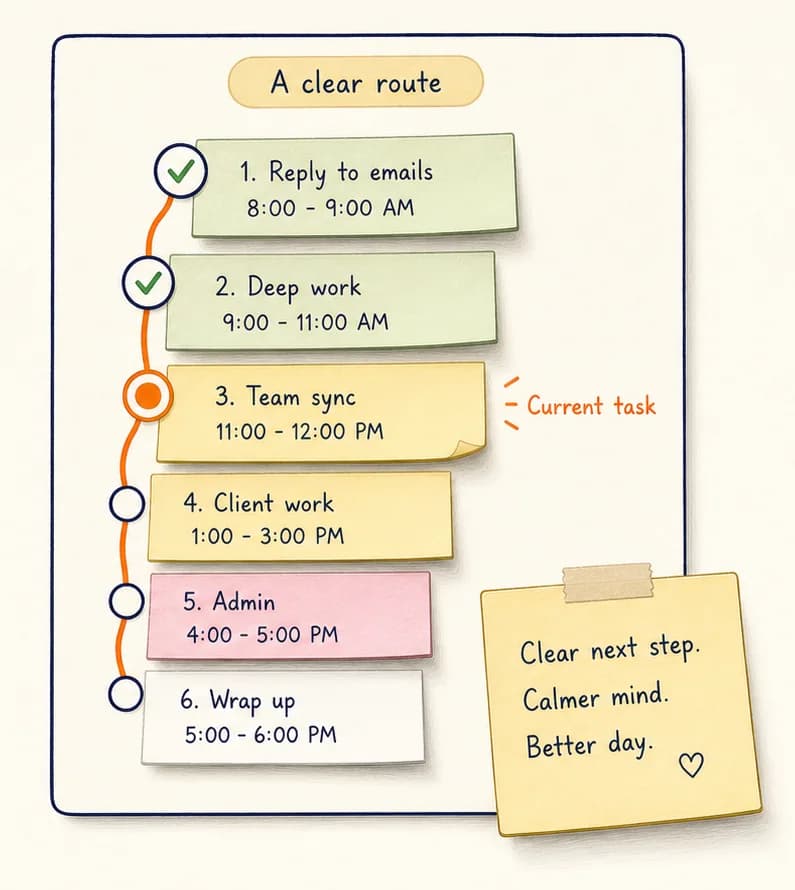
Place notes in the sequence you expect to follow and connect them as a route. Preparation can sit before a meeting, and follow-up can sit directly after it. You can understand the plan through position and connection instead of repeatedly reading priorities and due dates.

03

Keep one task current

TodoTrail
Daily plannerTime blockingWeekly plannerOrganization appsVisual todo listTask routesComparePricingBlogFeedbackPrivacyTermsSecurity

Mark the note you are working on as current. Upcoming work remains visible without demanding the same attention, while completed notes stay on the canvas as evidence of movement. Returning after an interruption takes one glance instead of another round of planning.

04

Change the plan without losing the day

Real days move. Drag a task to a new position, rewrite its content, or change its status while the rest of the route remains intact. The canvas supports adjustment without turning every change into a full reorganization.

05

Use it when sequence matters

Visual routes work especially well for focused work, meeting preparation, personal admin, study sessions, and small delivery plans. When tasks can happen in any order and only need capturing, a traditional list may still be the simpler tool.

PRACTICAL QUESTIONS

Before you build the route

Is TodoTrail a replacement for a full project backlog?

No. TodoTrail is designed for the short route that needs to move today. Keep long-term capture in your existing system if you need it.

Can I rearrange tasks after the route starts?

Yes. You can move notes, edit task content, and update statuses without resetting the rest of the route or its zoom level.

What makes this different from a kanban board?

A kanban board groups work by stage. TodoTrail emphasizes the intended sequence and one current step across today's selected tasks.

KEEP EXPLORING

Find the planning view that fits

Daily planner appA daily planner app that shows the way forwardTask route plannerBuild a Task Route You Can Actually FollowPractical comparisonTodoTrail vs. a Traditional Todo List